Coaching Corner
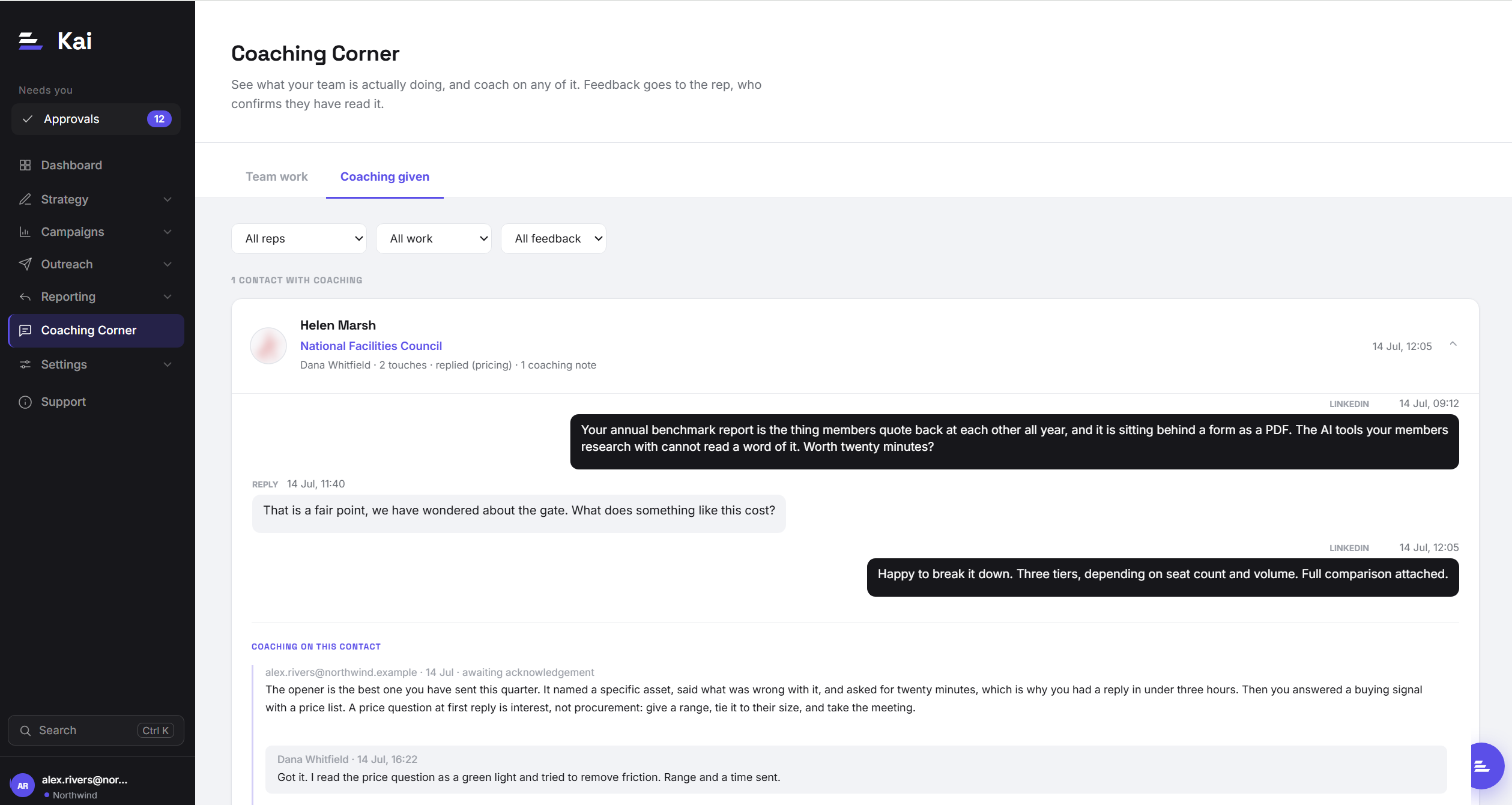
Coaching Corner is where a manager sees the actual work their team is doing, in the words that were actually sent, and can leave feedback on any specific piece of it. Feedback goes to the rep, who confirms they have read it. It is a conversation that closes, not a comment nobody acknowledges.
Why this page exists
Most coaching happens away from the work. A manager reads a dashboard, forms an impression, and gives feedback in a one-to-one a week later, by which point neither person can remember the specific message being discussed. The rep hears a general point about their technique and has nothing concrete to change.
Coaching Corner inverts that. You start from a real message, a real reply, or a real call, and the feedback is attached to it permanently. The rep opens the note and sees exactly what they sent next to what you said about it.
The two tabs
Team work
The merged feed of everything your team has actually done, newest first, grouped by contact. It pulls from five sources:
- Replies. What prospects wrote back, and how Kai classified it.
- Threads. The back-and-forth on a contact across email and LinkedIn.
- Sequences. What was approved and sent, including whether the rep edited it before approving.
- Calls logged in your outreach platform. Dials, connects, and outcomes.
- Recorded calls. If you have a call recorder connected, the real conversations, with duration and whether the call actually connected. See Connecting a call recorder.
Grouping is by contact rather than by event, so a contact who was sequenced, replied, and then had a call appears once with the whole story rather than three times out of order.
Coaching given
The notes themselves, as conversations. Each shows the work it was attached to, the note, whether the rep has acknowledged it, and any replies. This is the tab to open when you want to know what is outstanding rather than what happened.
Filters
Three dropdowns narrow both tabs: All reps (one rep or everyone you manage), All work (limit to replies, calls, sequences, and so on), and All feedback (limit to notes in a particular state, such as awaiting acknowledgement).
Leaving a coaching note
Open a contact card, read the thread, and write in the box under Continue the coaching. The placeholder is the standard to aim at: what should they do differently, and why. Then:
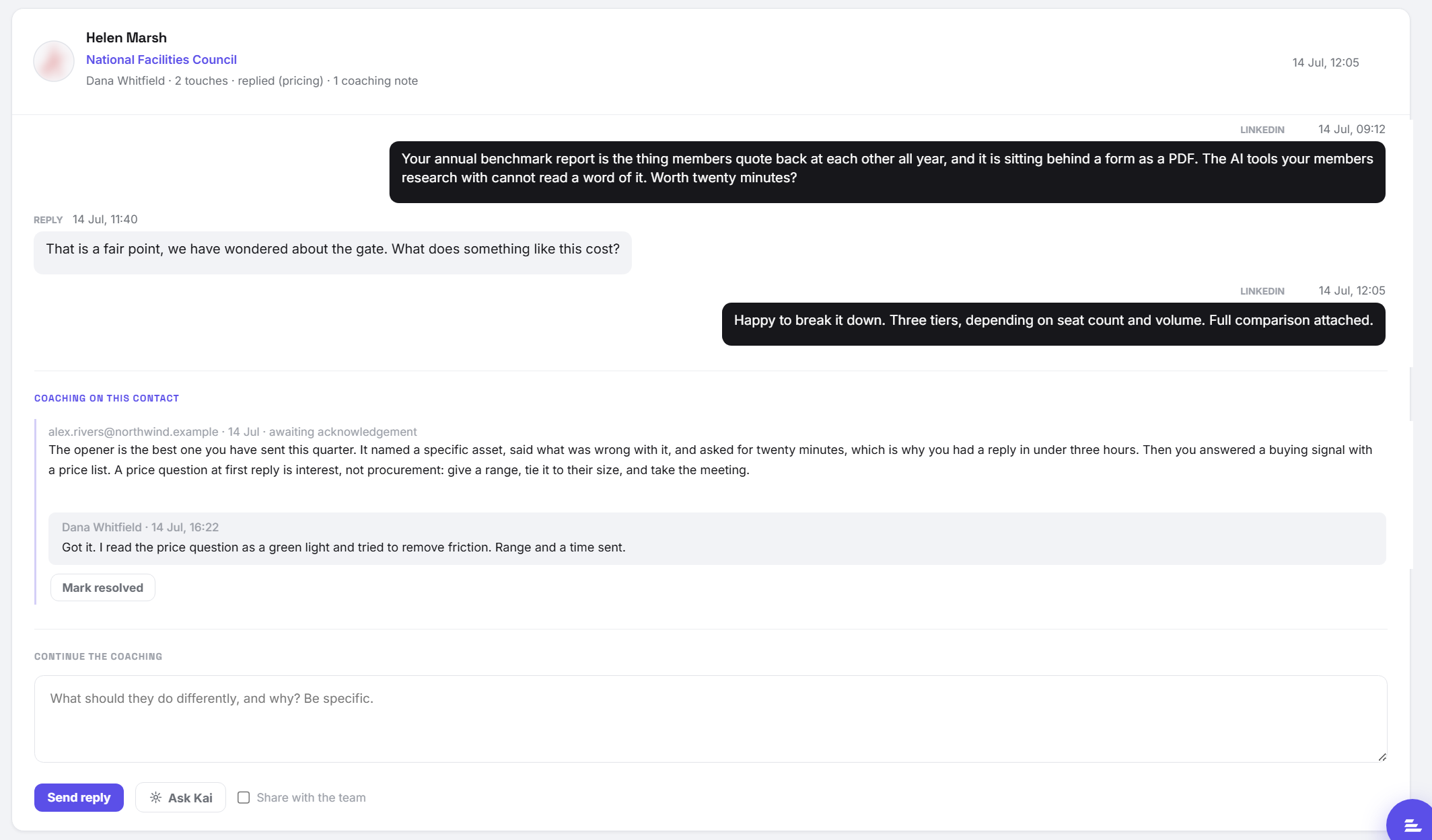
- Send reply posts the note. The rep sees it against this contact and is asked to acknowledge it.
- Ask Kai drafts a starting point from the thread in front of you. Useful when you can see the sequence went wrong but want a second read on why. Edit it before sending: it is a draft, not a verdict.
- Share with the team widens the note from one rep to the whole team. Use it for a good example worth copying, or a point that applies to everyone. Leave it unchecked and the note is private to that rep.
- Mark resolved closes the note once the point has landed. Resolved notes stay on the contact as history.
Who can see what
The visibility rules are deliberately simple, so there is never a question about who is reading a note.
- A manager sees the work and the coaching of the reps on their team.
- A rep sees only coaching addressed to them. Never a peer's, in either direction.
- A note shared with the team is visible to that whole team, which is what makes "here is a good example" safe to send.
- Admins and superadmins see the whole workspace.
Team membership is what makes a manager a manager here, so a manager with no team sees nothing. Set teams up first: see Teams & targets.
Using it well
A few habits that make the difference between a page people open and a page they act on.
- Coach the specific, not the general. "Your openers are weak" is not actionable. "This opener named the asset and asked for twenty minutes, which is why you had a reply in three hours" is.
- Coach the good ones too. The fastest way to raise a team's floor is to share the best message of the week with the whole team rather than only correcting the worst.
- Watch the edit signal. Sequences carry whether the rep edited before approving. Heavy editing across a campaign usually means the brief is wrong, not the rep. That is a fix in Instructions & briefs, not a coaching note.
- Close the loop. Mark notes resolved. An open list that never empties stops being read.
If the page is empty
An empty feed almost always means one of three things, in this order of likelihood:
- You have no team set up, so there are no reps whose work you can see.
- The reps on your team have no activity in the period, because nothing has been approved or sent yet.
- You are filtering on a work type with nothing behind it, for example recorded calls with no recorder connected.
Reset the three filters first. If it is still empty, check the team roster.